By Clixtell Content Team | July 29, 2026
Estimated reading time: 8 minutes
Google Ads Clicks vs GA4 Sessions: Why the Numbers Don’t Match
Google Ads clicks and GA4 sessions are not expected to match perfectly because they measure different moments in the customer journey.
Google Ads records an interaction when someone clicks an ad. GA4 records a session only after the visitor reaches the website and Analytics successfully begins collecting activity.
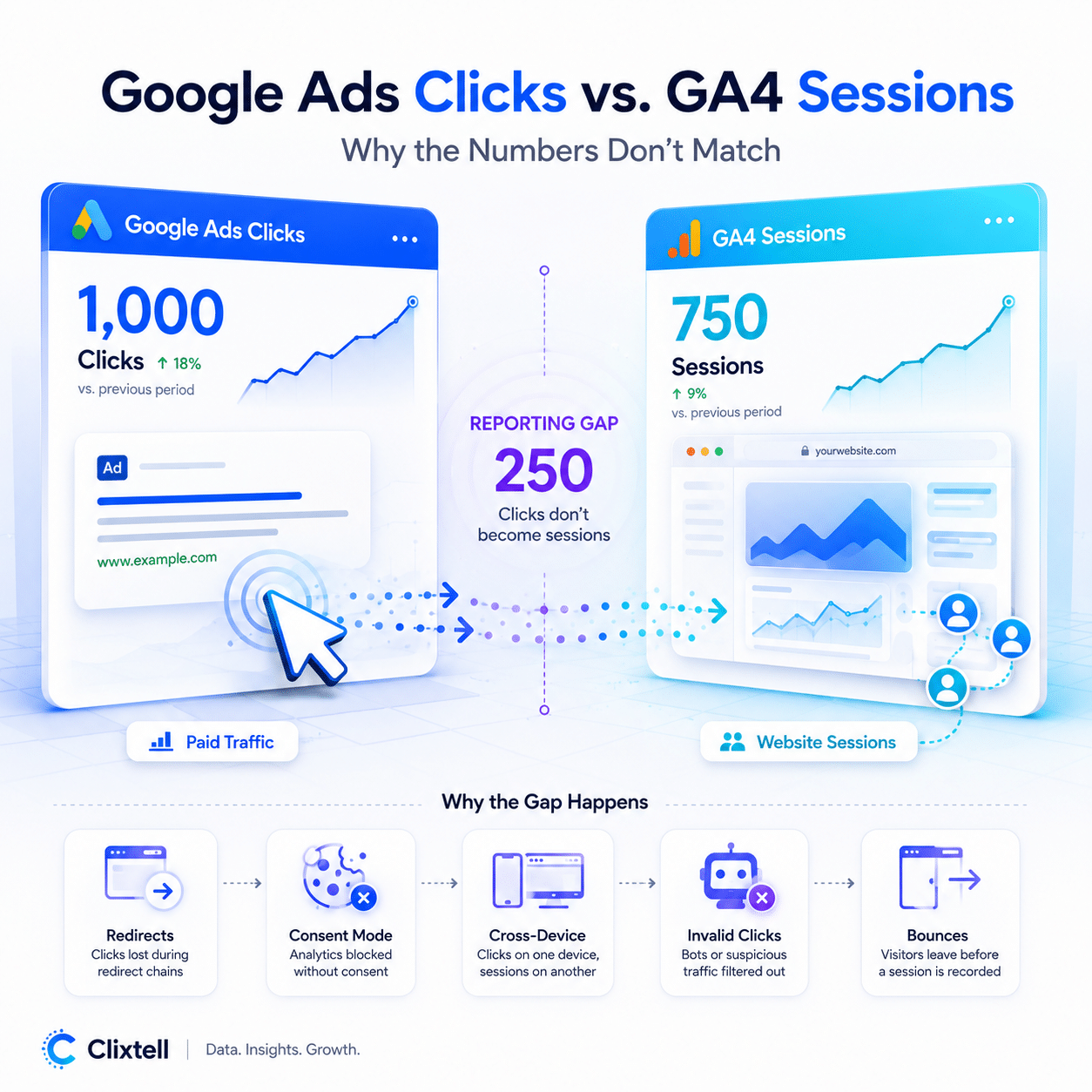
This means an advertiser may see 1,000 Google Ads clicks but only 750 GA4 sessions without necessarily having a tracking failure or a click fraud problem.
The difference becomes useful only when it is broken down by campaign, landing page, device, browser, and location. The total gap alone cannot reveal whether the cause is normal user behavior, lost measurement, technical issues, or questionable traffic.
What Is the Difference Between a Google Ads Click and a GA4 Session?
A Google Ads click is counted when a user interacts with an eligible ad and is directed toward the advertiser’s website or another destination.
A GA4 session is a period of activity that Analytics was able to measure on the website or app. For the session to appear, the landing page must load, the Analytics code must run, the browser must allow the collection process, and the data must successfully reach Google.
The click can therefore be registered before the visitor becomes visible in GA4.
Google’s official explanation of clicks and sessions discrepancies confirms that Google Ads and Analytics use different measurement methods and that differences can result from both technical and behavioral factors.
The objective is not to make the two figures identical. The objective is to understand where the difference comes from and whether it has changed in a meaningful way.
Why Are Google Ads Clicks Higher Than GA4 Sessions?
There are several common reasons why Google Ads may report more clicks than GA4 reports sessions.
A Visitor Can Click the Same Ad More Than Once
A user may click an ad, visit the website, return to Google, and then click the same ad again.
This behavior is common when people compare several companies, prices, or products. A visitor may also open the same ad in more than one browser tab.
Google Ads can record these interactions as separate clicks. GA4 may continue to group the activity within one session if the existing session is still active.
Several clicks from one user are therefore not automatically fraudulent. The context, timing, and behavior surrounding those clicks matter.
The Visitor Leaves Before GA4 Loads
Google Ads may record the click before the landing page finishes loading.
The visitor might close the tab, press the back button, lose their internet connection, or abandon a slow page before the Analytics code sends its first event.
This can create a measurable difference between clicks and sessions, especially on mobile devices or landing pages that load slowly.
A discrepancy concentrated on one particular landing page may indicate a performance problem. Before investigating traffic quality, check whether the page loads consistently across different browsers, devices, and connection speeds.
GA4 Is Not Running on Every Landing Page
Tracking problems are often limited to specific pages rather than affecting the entire website.
GA4 may work properly on the homepage but be missing from a campaign landing page, subdomain, checkout page, or recently published template.
Possible causes include:
- An unpublished Google Tag Manager container
- Incorrect tag-trigger configuration
- JavaScript errors
- Conflicts between tracking scripts
- Landing pages built outside the main website template
- Website updates that removed or delayed the Analytics code
Test the exact landing pages used in active advertising campaigns rather than checking only the main website.
Advertisers who identify broader tracking inconsistencies can perform a structured Google Ads conversion tracking audit to review tags, events, landing pages, and recent website changes in more detail.
Consent and Browser Privacy Affect Measurement
Analytics collection may depend on the visitor’s consent choice and the way the website’s consent management platform is configured.
Some users reject Analytics cookies. Others use browsers, extensions, or privacy tools that restrict tracking scripts.
In these situations, Google Ads may still record the original ad interaction while GA4 receives limited or no information about the website visit.
Compare the clicks-to-sessions difference by browser, device, and country. A discrepancy that appears mainly in one browser or region may point toward privacy settings or consent behavior rather than a campaign-quality problem.
The GCLID Is Lost During the Visit
When Google Ads auto-tagging is enabled, Google adds a Google Click ID, known as the GCLID, to the landing-page URL.
This identifier helps connect the paid click with the relevant advertising campaign and post-click activity.
Redirects, cross-domain journeys, and URL-cleaning scripts can remove the GCLID before the final page loads. The website visit may still appear in GA4, but its traffic source could be incomplete or incorrectly attributed.
Advertisers should test the actual final URL used by the ad and verify that the GCLID remains present after every redirect.
Our guide to the Google Click ID explains how the identifier supports paid-traffic attribution and why preserving it is important.
You should also confirm that the correct Google Ads account is linked to the correct GA4 property.
Reporting Settings Are Not Aligned
Sometimes the apparent discrepancy is created by the comparison itself.
Before drawing conclusions, confirm that both reports use the same:
- Date range
- Time zone
- Google Ads account
- Campaign selection
- Geographic filters
- Device filters
Avoid comparing partial days whenever possible. Different processing times and time-zone settings can make same-day reports appear less consistent than reports based on completed days.
Single-page applications can create additional measurement problems when route changes occur without a full page reload. In these cases, the initial session may be recorded while later navigation remains incomplete.
Can GA4 Sessions Be Higher Than Google Ads Clicks?
Yes. One original ad click may be followed by more than one GA4 session.
A visitor can click an ad, leave the website, and return later. A new session may also begin after the earlier session has timed out.
However, those later sessions will not necessarily appear as paid sessions in every GA4 report. Their classification depends on the reporting dimension, session attribution, and the way the visitor returned.
This is why advertisers should avoid treating clicks and sessions as two sides of a simple one-to-one calculation.
What Is a Normal Difference Between Google Ads Clicks and GA4 Sessions?
There is no universal percentage that is normal for every advertising account.
The expected difference depends on factors such as:
- Website speed
- Consent rates
- Browser and device mix
- Repeat-click behavior
- Redirect configuration
- Campaign type
- Tagging quality
- Reporting settings
Instead of looking for a fixed benchmark, establish a baseline for your own account.
Compare the relationship between clicks and sessions over several weeks. Then review the difference by campaign, landing page, browser, device, and location.
A consistent gap may have a reasonable explanation. A sudden change is more important, particularly when it begins after a website release, consent update, tracking change, or new campaign launch.
Concentration matters as well. A discrepancy isolated to one campaign or landing page is usually more actionable than a similar percentage spread evenly across the account.
How to Diagnose Google Ads Clicks Not Matching GA4
Use a focused investigation process:
- Match the reporting period, advertising account, and time zone.
- Confirm that GA4 loads on every paid landing page.
- Test whether the GCLID survives all redirects.
- Review the difference by campaign, device, browser, and landing page.
- Check consent settings and recent website changes.
- Investigate traffic quality after measurement issues have been ruled out.
This order is important. If you change tracking, campaign settings, and website code at the same time, it becomes difficult to identify what actually caused the discrepancy.
Does a Clicks-to-Sessions Gap Mean Click Fraud?
No. A difference between Google Ads clicks and GA4 sessions is not proof of click fraud.
Google defines invalid clicks as interactions that do not result from genuine user interest, including intentionally fraudulent activity, accidental interactions, and certain duplicate clicks.
Google also automatically filters invalid clicks that its systems identify and does not charge advertisers for those filtered interactions.
Suspicious traffic can still contribute to a clicks-to-sessions gap. Some automated or low-quality traffic may leave immediately, fail to execute JavaScript normally, or repeatedly generate clicks with almost no meaningful website activity.
The discrepancy becomes more concerning when several warning signs appear together:
- Repeated clicks from the same device
- Extremely short visits
- Activity from unexpected locations
- High paid-click volume with almost no engagement
- Repeated activity from VPNs, proxies, or unusual networks
- A sudden gap concentrated in one campaign or time period
A single sign may have an innocent explanation. A consistent combination of unusual signals deserves closer review.
How Clixtell Helps Investigate Paid-Click Quality
GA4 shows the website activity it successfully measured. Clixtell adds a separate investigation layer at the paid-click level.
After tracking issues have been checked, Clixtell’s automated click fraud protection can help advertisers determine whether the reporting gap is concentrated around recurring devices, IP addresses, suspicious networks, unusual locations, or consistently weak post-click behavior.
Clixtell does not treat every Google Ads click missing from GA4 as fraudulent. A missing GA4 session can be caused by consent, a slow page, a closed browser tab, or a broken tracking tag.
The value of the system comes from combining the available signals surrounding each paid click.
For example, a missing or extremely short session becomes more relevant when it is connected to a device that clicked repeatedly, a network associated with proxy activity, or a pattern that appears across several campaigns.
Clixtell provides an independent view of paid-click activity on the advertiser’s website. Its data should not be presented as identical to Google’s invalid-click metric because the two systems use different information and perform different roles.
The practical distinction is simple:
GA4 helps explain what was measured after the visitor reached the website. Clixtell helps advertisers examine the quality, repetition, and behavior behind paid clicks.
FAQ
Why Are Google Ads Clicks Higher Than GA4 Sessions?
Google Ads records the ad interaction before GA4 measures the website visit. Repeat clicks, slow pages, missing tags, consent restrictions, browser privacy settings, and visitors leaving immediately can all result in more clicks than sessions.
Review the difference by campaign, browser, device, and landing page before assuming that it reflects a traffic-quality problem.
Can Multiple Google Ads Clicks Create One GA4 Session?
Yes. A user may click the same ad several times while one Analytics session remains active. Google Ads may count those interactions separately while GA4 records one session.
Repeat clicks are not automatically fraudulent. Their timing, frequency, source, and surrounding behavior should also be considered.
Can One Google Ads Click Lead to Multiple GA4 Sessions?
Yes. A visitor may leave the website and return later, creating another session.
However, later sessions may not appear as paid sessions in every GA4 report because their classification depends on attribution, the reporting dimension, and the way the visitor returned.
Can Bots Click Google Ads Without Creating a GA4 Session?
It is possible. Some automated traffic may not execute JavaScript, accept cookies, or remain on the page long enough for GA4 to collect activity.
Missing sessions alone do not prove that bots are responsible. The pattern becomes more relevant when it is combined with repeated devices, suspicious networks, unusual locations, or consistently weak engagement.
Should Google Ads Clicks and GA4 Sessions Match Exactly?
No. Google Ads clicks and GA4 sessions measure different stages of the customer journey and use different collection methods.
Advertisers should focus on whether the difference is stable, explainable, or concentrated within a particular campaign, landing page, browser, or device type.
Does a Clicks-to-Sessions Discrepancy Prove Click Fraud?
No. The discrepancy should first be checked for tracking, consent, attribution, redirect, account-linking, and website performance problems.
Traffic quality should be investigated after technical issues have been ruled out and suspicious paid-click patterns remain.
Google Ads clicks vs GA4 sessions is not a one-to-one comparison.
Google Ads records the interaction with the ad. GA4 records the website activity it was able to collect after that interaction.
Start by checking the reporting period, landing pages, Analytics tags, consent behavior, GCLID preservation, redirects, and account linking. Then identify whether the discrepancy is concentrated around a particular campaign, browser, device, or page.
When the measurement setup is sound and unusual paid-click patterns remain, Clixtell can provide additional context by connecting repeat activity with device, network, location, and post-click behavior signals.
The gap is not the conclusion. It is the starting point for a more accurate investigation.