By Clixtell Content Team | January 27, 2026
Estimated reading time: 13 to 16 minutes
Geo Spoofing in Google Ads: How to Catch Location Mismatches Fast
You target 1 city. Google Ads shows clicks from that city. But the traffic does not act like it is local.
Leads drop. CTR looks fine. The same campaign that used to work now feels noisy.
Many advertisers call this “Geo Spoofing”. The problem is that “Geo Spoofing” can mean 2 very different things in the world of Google Ads. Depending on which one you meant, here is how you can refine the topic to make it even more effective for your readers.
This guide focuses on click level location issues and how they show up inside Google Ads performance. It also explains 1 critical naming issue that confuses teams and wastes time: Location Mismatch is not the same as Destination Mismatch.
- What geo spoofing means in Google Ads and why the term causes confusion
- The 2 meanings of geo spoofing and which one this article covers
- Location Mismatch vs Destination Mismatch: avoid the policy confusion
- Why Google Ads location can look wrong even when nothing is “hacked”
- A fast workflow to spot Location Mismatch in 15 minutes
- How to validate spoofing vs normal routing and cross border behavior
- Where Location Mismatch shows up most: Search, Search Partners, Display, Performance Max
- Fix settings first: the 5 self inflicted causes of “geo spoofing”
- How to block patterns safely without killing conversions
- What to save as evidence before you escalate or request refunds
- Clixtell workflow: Geo Blocker, VPN checks, ISP and range blocks, session proof
- FAQ
What geo spoofing means in Google Ads and why the term causes confusion
In PPC conversations, “geo spoofing” usually means this: a click appears to come from your target location, but the user is actually somewhere else. The “somewhere else” can be a different city, a different country, or a network that hides location using VPNs and proxies.
But the same phrase is also used for a different problem: fake business locations and local listing abuse, where a company pretends to be in your city. That matters, but the signals and fixes are different.
This article covers click level location problems in paid traffic and how to catch them fast. If your issue is a fake listing on maps, you should treat it as a business profile and platform enforcement problem, not an ad click location problem.
The 2 meanings of geo spoofing and which one this article covers
Meaning 1 is click location spoofing. This is what most advertisers mean when performance drops and traffic quality feels wrong. You see “local” clicks in reports, but on site behavior and outcomes do not match local intent.
Meaning 2 is business location spoofing. This is when a business claims a local presence it does not have. It shows up in local results and can steal calls and leads, even if your Google Ads clicks are fine.
The fastest way to choose the right bucket is to look at your symptom: if you are paying for clicks and those sessions behave like non local or automated traffic, you are in Meaning 1. That is what the rest of this guide solves.
Location Mismatch vs Destination Mismatch: avoid the policy confusion
Many readers search for “mismatch” and land on the wrong fix. In Google Ads terminology, Destination mismatch is a policy violation about URLs, not geography.
Destination mismatch happens when your ad URL experience does not match where the user ends up, often due to tracking templates, redirects, inconsistent domains, or display URL issues. If your ads are disapproved, fix the URL policy problem first. Use this official reference for Destination mismatch.
Location Mismatch is the practical problem this article focuses on. It means the geography you targeted does not align with where your traffic appears to come from, or how it behaves.
Keep the terms separate: Destination mismatch is “wrong website”. Location mismatch is “wrong geography”.
Why Google Ads location can look wrong even when nothing is “hacked”
Google Ads location is not a single source of truth. It is an estimate based on multiple signals and settings. That is why you can see location inconsistencies even in honest traffic.
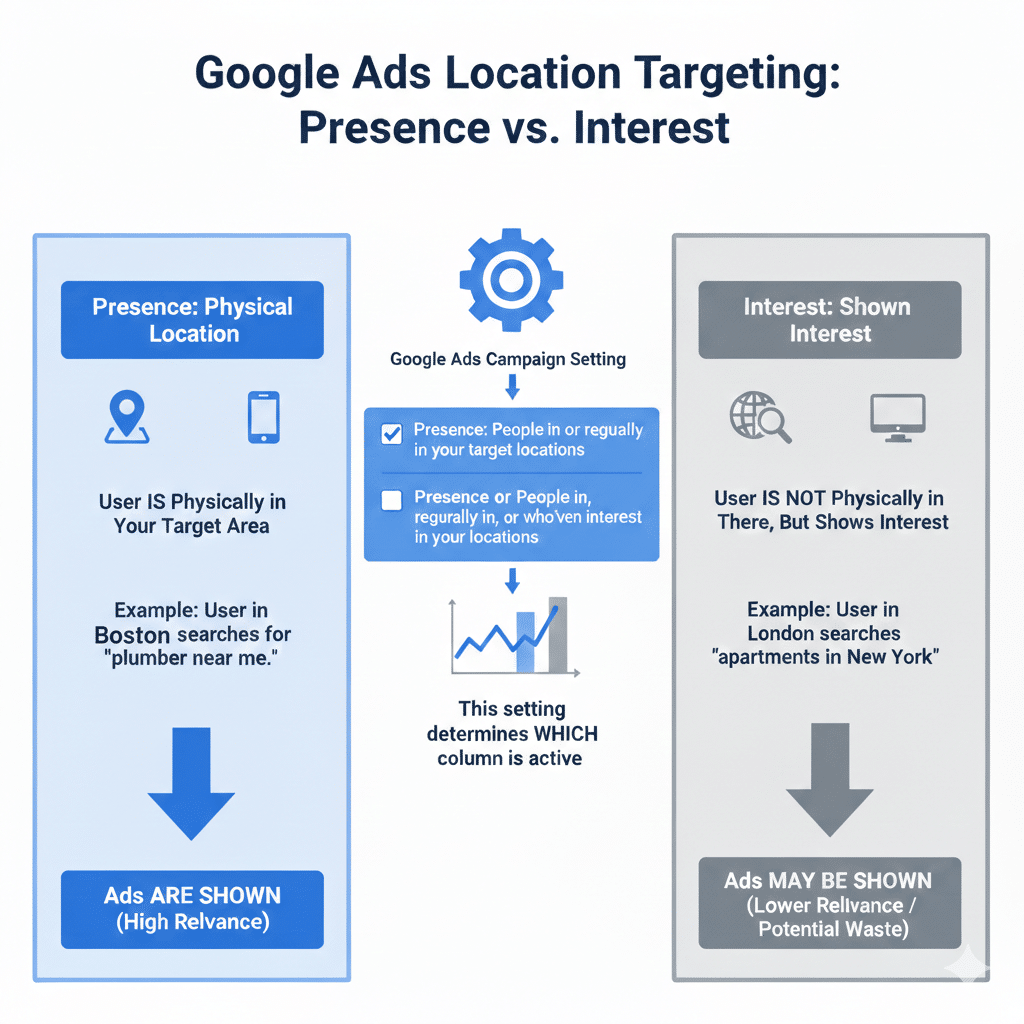
The most common reason is your campaign setting. If you use the broad option that targets people in your location or people who showed interest in your location, your ads can serve outside the area. For local services, this often creates wasted spend that looks like a geo issue.
The second reason is routing. Mobile carriers, corporate networks, shared Wi Fi, and privacy tools can shift how location appears. A user can be physically in 1 place while their apparent IP exits in another place.
The third reason is automation and click fraud. Some attackers rotate routes to make clicks look normal. Some traffic sources generate distributed clicks where each IP clicks only once.
Your goal is not to argue with the report. Your goal is to validate what is real, then take controlled action.
For the official setup references, use Google Ads location targeting and advanced location options.
A fast workflow to spot Location Mismatch in 15 minutes
Start small. Do not audit the whole account first. Pick 1 campaign that used to perform and recently declined.
Then run this workflow in order. Each step should either confirm “this is settings” or “this is a segment that needs deeper review”.
1) Confirm your targeted locations are correct. Look for old radius targets, copied campaigns with leftover locations, and broad regions added by mistake.
2) Check the advanced location option setting. If you are local and you want physical presence, a broad interest setting can explain the mismatch. If you are national and remote, broad targeting can be valid.
3) Open the Locations report and compare targeted vs matched. If you see meaningful volume outside the target area, that is a clear Location Mismatch signal. If matched looks “perfect” but outcomes are falling, you may be dealing with routing or spoofed traffic that still looks local.
4) Segment by network. Compare Search vs Search Partners vs Display. If mismatch concentrates in 1 network, your cause is likely inventory quality and routing, not your base targeting list.
5) Compare outcomes for the suspicious slice. Do not only look at clicks. Look at conversion rate, lead quality proxies, call actions, and funnel progression. The segment that matters is the one that consumes spend and produces weak intent.
How to validate spoofing vs normal routing and cross border behavior
Location mismatch is not automatically Invalid clicks. You need validation signals that reduce guessing. The safest decisions come from repeated patterns, not from 1 odd click.
Signal 1: A sharp mismatch between CTR and downstream intent. If CTR rises while conversion rate drops in the same segment, you may be paying for low quality traffic that looks normal in surface reporting.
Signal 2: Time patterns that do not fit your market. If a local campaign gets a repeated spike at hours that do not match normal demand, that often points to automation or offshore activity.
Signal 3: Language and browser patterns that contradict the “local” story. Language alone is not proof. Repeated mismatch across the same segment is useful evidence.
Signal 4: Distributed behavior. If each IP clicks only once but the same low intent pattern repeats, single IP blocking will not keep up. This is where geo rules, provider patterns, and range patterns matter.
Signal 5: Provider concentration. If the suspicious clicks cluster into a small set of service providers, data center style ranges, or repeated routing patterns, you are likely seeing a controllable source, not random consumer behavior.
Signal 6: Similar on site behavior. Humans do not behave in perfect sync. Automated traffic often repeats the same short path, the same time on page pattern, and the same lack of interaction.
If you want a simple macro reason to take validation seriously, automated traffic is now a major share of the web. The Imperva report summarized by Thales states that automated bot traffic surpassed human traffic in 2024 and accounted for 51% of all web traffic, with bad bots at 37%. Read the summary here: Imperva bad bot report summary.
That does not mean your clicks are “all bots”. It means you should not assume every odd location signal is a one off. Validate, then act.
Where Location Mismatch shows up most: Search, Search Partners, Display, Performance Max
Location mismatch is not evenly distributed across inventory. Knowing where it concentrates saves time.
Search is often the cleanest source. When mismatch is heavy in Search, your first suspects should be settings and query intent. Some high intent queries attract automation and competitor behavior, especially in local services.
Search Partners can be valid, but it can also amplify low quality traffic in some industries. If you suspect mismatch here, run a controlled test: turn Search Partners off for 7 days and compare lead quality and geo consistency. If quality improves, you found a segment worth isolating.
Display can produce high volume and low intent, depending on placements and app inventory. If mismatch is heavy, focus on placement exclusions and conservative targeting before you assume “spoofing”.
Performance Max bundles multiple inventories, so isolation is harder. The fastest PMax check is comparative: measure the same geo segment across Search and PMax. If PMax shows a sharper mismatch and weaker intent, the issue is often inventory mix and targeting breadth.
Fix settings first: the 5 self inflicted causes of “geo spoofing”
Before you block anything, remove the common causes that make real traffic look wrong. These fixes also make your later blocking decisions safer.
1) Broad location options that do not match your delivery model. If you only serve people physically in the area, use presence focused targeting and exclude what you do not serve.
2) Overlapping radius targets that accidentally include areas you did not intend to target. These can quietly pull in a wide region and make reports look “mixed”.
3) Missing location exclusions. Many accounts never exclude nearby non service areas that repeatedly waste spend. Exclusions are normal maintenance, not an admission of failure.
4) Language settings that widen reach beyond what you can serve. Language does not equal location, but language can amplify irrelevant traffic in some local markets.
5) Landing pages that are too generic. If your page does not clearly confirm location relevance, you can get more curiosity clicks from outside the area. That can look like a geo issue when it is actually a relevance issue.
After these 5 checks, rerun the Location report. If mismatch remains and outcomes still fall in a specific segment, move to controlled blocking.
How to block patterns safely without killing conversions
Blocking is where teams either fix the problem or create a new one. The goal is not to block aggressively. The goal is to block safely, measure impact, then tighten only when the data supports it.
Use layers, in this order, from lowest risk to higher risk.
Layer 1 is geo rules that match your service area. If you do not serve outside your target geographies, blocking out of area clicks is often the cleanest first move. Use the Geo Blocker to block clicks outside your targeted areas, then monitor conversion stability.
Layer 2 is VPN and proxy validation. If the “wrong location” is often a privacy tool, you should be careful about assuming malicious intent. Use VPN and proxy detection as a way to explain why a click can look local while the origin is masked.
Layer 3 is service provider patterns. When suspicious traffic clusters into a small set of providers, you can block the source instead of chasing single IPs. Use the ISP blocker carefully and only after you see repeated waste in the same provider slice.
Layer 4 is range level blocking. Distributed patterns often defeat single IP blocks. When clicks spread across many IPs but still cluster into a known range, range controls can reduce waste faster. Use the IP range blocker, and keep sensitivity conservative until you confirm the segment is truly low value.
Layer 5 is maintaining your ad platform exclusions. Keep your exclusions consistent and documented, especially if multiple people manage the account. This guide helps teams stay organized with IP blocking and exclusions.
If you want a market level reality check on why quality control matters, multiple studies estimate large ad fraud losses. Juniper Research estimates that ad fraud cost marketers $84 billion in 2023 and projected $172 billion by 2028. A readable summary is here: ad fraud cost estimates.
What to save as evidence before you escalate or request refunds
If you want to escalate internally, to a client, or to a platform support request, save evidence before you make big changes. You want a clean snapshot of “what happened” and “how it affected outcomes”.
Keep it simple. Save the minimum set that proves the pattern.
1) A Locations report export showing the mismatch segment and spend.
2) A network segmented view showing where the mismatch concentrates.
3) A conversion comparison for the same segment, before and after the issue began.
4) A behavior snapshot for the segment, using your analytics engagement signals or lead quality proxies.
5) A short change log note: what changed on the site, tracking, or campaigns near the time the mismatch appeared.
Clixtell workflow: Geo Blocker, VPN checks, ISP and range blocks, session proof
A good workflow makes Location Mismatch easier to solve because it keeps you consistent. You stop reacting to 1 weird day and start managing repeat patterns.
Start with the Geo Blocker to enforce your service area. Then validate whether VPN or proxy behavior explains the apparent mismatch. If waste still concentrates, use ISP and range controls to block repeat sources.
The key is to keep every action measurable. Apply the change to 1 campaign group first. Compare conversions and lead quality. Expand only after the results are stable.
When you have uncertainty, confirm with session level proof. Do not guess based on 1 metric. Confirm the pattern using behavior consistency, then apply the least risky block that solves the segment.
If you also store click identifiers and want to validate attribution paths, this reference helps: gclid.
FAQ
What does geo spoofing mean in Google Ads?
It usually means clicks appear to come from your targeted location while the user is somewhere else, often due to VPNs, proxies, or routing. Some people also use the phrase for fake business locations. This article covers paid click location issues and Location Mismatch.
What is a Google Ads location mismatch?
It is the practical problem where the geography you targeted does not align with where your traffic appears to come from or how it behaves. It is not the same as Destination mismatch, which is a URL policy issue.
What is Destination mismatch in Google Ads?
This is a Google Ads policy violation related to URLs, tracking templates, and redirects. If your ads are disapproved for Destination mismatch, fix the URL consistency first, then return to the location investigation.
Can VPN usage cause wrong location reporting?
VPN usage can make a click appear to come from the wrong location. That does not always mean fraud, but it can hide repeat sources. Validate patterns and outcomes before you block aggressively.
What should I do if suspicious clicks are distributed across many IPs?
If suspicious clicks are distributed across many IPs, single IP blocking is often too slow. In those cases, use geo rules first, then add ISP and IP range controls for repeat patterns, and measure impact on conversions.
Clixtell Content Team Clixtell publishes practical PPC content focused on measurement stability, conversion accuracy, and traffic quality workflows. The goal is clear examples and repeatable checks you can apply across Google Ads accounts. View LinkedIn Profile